Saturday, 19 September 2015

SAS by Ron Cody - Practice problems with solution


OUTPUT


In this program we have used where statement to print the observations from data set based on some conditions.


OUTPUT


Here we have Used retain statement and sum to find the sale to date that is cumulative sales.


    OUTPUT

Using do statement to run an iterative loop and find the log for each value.


OUTPUT


Using do until to find the number of years for the amount to reach atleast 30,000.


OUTPUT

using yrdif function to find age from dates. 


OUTPUT


intck function is used to find the number of months between two dates. it can be used to find number of years,weekdays as well as quarters between two specific dates.


OUTPUT


OUTPUT

Using in function with merge and getting output based on conditions.


OUTPUT


The use of n and nmiss function to find number of non missing and missing values.


OUTPUT


Use of arrays to replace 999 with missing value.

Sunday, 9 August 2015

Knowing Python Part 3

Reading CSV files

The data for this part can be download from http://openflights.org/data.html .
Lets start working on this csv file.

Lets import and open this csv file in python.


Now lets fetch the airport names for some explicitly defined countries.Lets take the example of Australia.


Explanation of the above code:
1.) First create an empty dictionary Airport.
2.) Then each row is exported into an array line[].
3.) Now in the if statement we check the third column (containing country name) and the first column      (airport name).If the dictionary has country name as key in it we would append the value to it, else      create a new key as a new country.
4.) At last print the values assigned to the dictionary key="Australia" to see the names of the airport        in Australia.

Airline Route Histogram

Now lets plot a histogram showing the distribution of distances over each flight schedule.
To do so we need to follow the below mentioned steps:

1.) Read the airport file and build a dictionary mapping unique ID of airport to the latitude and        longitude which will help in looking up the location of each airport by its ID.

2.) Read the routes files and get the IDs of the source and destination airports. Using the                latitude and longitude, calculate the length of the route and append it to a list of all route            lengths.

Now in order to measure the distance we need a new module called "geo_distance"


Output


The Final Code
import numpy as np
import matplotlib.pyplot as plt
latitudes = {}
longitudes = {}
f = open("airports.dat")
for row in csv.reader(f):
    airport_id = row[0]
    latitudes[airport_id] = float(row[6])
    longitudes[airport_id] = float(row[7])
distances = []
f = open("routes.dat")
for row in csv.reader(f):
    source_airport = row[3]
    dest_airport = row[5]
    if source_airport in latitudes and dest_airport in latitudes:
        source_lat = latitudes[source_airport]
        source_long = longitudes[source_airport]
        dest_lat = latitudes[dest_airport]
        dest_long = longitudes[dest_airport]
        distances.append(geo_distance.distance(source_lat,source_long,dest_lat,dest_long))
plt.hist(distances, 100, facecolor='r')
plt.xlabel("Distance (km)")
plt.ylabel("Number of flights")

       Explanation
We need to read the airport file (airports.dat) and build a dictionary mapping the unique airport ID to the geographical coordinates (latitude & longitude.)
We need to read the routes file (routes.dat) and get the IDs of the source and destination airports. And then look up for the latitude and longitude based on the ID . Finally, using these coordinates, calculate the length of the route and append it to a list distances = []of all route lengths.
At last a histogram is plotted based on the route lengths, to show the distribution of different flight distances.
Output :


Knowing Python Part 2

Visualisation in Python

Lets continue from where we left lets create a few charts and graphs based on the results we got from our Voting Count section.

An important library called matplotlib is used in python to create graphical charts.We will take the example from the previous blog and generate bar graph to display the vote counts.Lets first load the data in the console.
Remember : We need to add an extra line to our code if using python instead of ipython.
i.e plot.show().

Lets start creating a bar graph


Lets go line by line and understand the above code.
1.) First we import the modules numpy and pyplot.
2.) Then we have split the dictionary into two (i)Names (ii) Votes.
3.) We create a range of indexes for the x values in the graph,one entry for each item in the counts             dictionary numbered 1,2,3 and so on, this will help in spreading the bar graphs evenly across the         x-axis.
4.) plt.bar() - it creates a bar graph,using x values as the x-axis and the values in the votes array as the      height of each bar.
5.) plt.xticks(x+0.5,names,rotation=90) - This gives labels to the x-axis.


Source: http://opentechschool.github.io/python-data-intro/core/charts.html

Knowing Python Part 1

Vote Counting Problem


Let us try and understand how python is used in extracting and presenting useful information from a pile of data. We have a dataset called radishsurvey.txt.

The problem statement: Try to figure out :

1.) Whats the most popular radish variety?
2.) Whats the least popular one?
3.) Has anybody voted twice?

Introduction
We have a survey in txt format which has 300 rows of data. Below is the screenshot for the file. Save this file in the default directory.


Analyses on data

Reading the data:


In the above code we will strip out line by line and split the code into two variables
(i) Name and (ii) Vote and print these two variables.
Note: The strip function is used to strip off the trailing new line ("\n").


Through this code we have made two arrays name[] and vote[] and added the values of the respective variables.

Output for the above code would be:


Lets check for duplication:


From the output it could be inferred that there are a few duplicate values.

So lets clean this dirty data.
1.) Lets create an empty array named voted.
2.) Lets go through each line and take out the names of the voters.
3.) By using capitalize() lets convert the names in capital letters and by using replace() get rid of the        extra empty spaces found between firstname and surname.

By running this code the frauds could be found out.

To make the lines of code shorter we will make use of some user defined functions.


So this is our result.

Source: http://opentechschool.github.io/python-data-intro/core/strings.html

Tuesday, 7 July 2015

Data Representation

Data is the crux of analytics and is displayed in a lot of ways. To start with analytics we need to understand data displayed in various ways. Lets talk about a few ways in which data can be displayed and the advantages of the methods. 

Data Matrix: Each row in a data matrix represents an observation and the columns contain variables which provide useful information about the respective observations. The convenience with matrices is that additional observation and variables can be easily added to an already existing data. Thats the reason it is a very common way of storing and understanding data.


Players Runs Scored Average Half Centuries
Anuj Sharma
1250
48.20
8
Bhavesh Singh
2200
52.60
14
Abhijeet Garg
1980
26.50
5
Abhishek Malik
580
18.00
0


Scatterplot: It is a graphical representation of two numerical variables in an observation-by-observation manner. The advantage of using a scatterplot is that a relationship or association between the variables can be easily spotted.


Dot plot: A dot plot is useful when a single variable has to be represented and is useful only for small data sets. It can be called a single variable scatterplot.


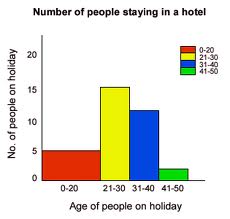
Histogram: Now dot plot is for small data sets but what if the data sets are large,for that we have histograms. It is difficult to display each observation as the data set is large therefor the data is divided into groups or bins and these bins are plotted as bars.
Histograms are convenient when it comes to describing the shape of data distribution and to understand if the data is skewed or symmetric.Looking at the peaks of the histogram it can be easily understood if the data in unimodal,bimodal or multimodal.


Box plot: Box plot represents data in a way that the median,1st quartile,3rd quartile,interquartile range,lower and upper whiskers as well as the outliers are prominent. It is used when we want to check any of these statistics. It is sometimes also known as whisker plot.


Contingency Table: Contingency tables are used to represent data for two categorical variables. The values represent the count of the corresponding combination of variables. it is useful for examining the relationship between these categorical variables.


Bar Plot: It is used to display a single categorical variable.